
Summary
GibbsCAM 2025 adds two independent turning controls. Rib Cut Plunge creates spaced full-engagement plunge cuts and then removes the remaining ribs to reduce deflection and improve chip control. Headstock Origin records the distance from the guide-bushing front to the headstock zero position so Swiss simulation bodies can be positioned correctly. Validate each feature only in its applicable process or machine configuration.
Table of Contents
- What Changed in GibbsCAM 2025
- Before You Begin
- Rib Cut Plunge
- Configure Swiss Headstock Origin
- Best Practices
- Troubleshooting
- Related Articles
What Changed in GibbsCAM 2025
Before You Begin
• Use GibbsCAM 2025 with Turning, the approved machine definition, and the correct production postprocessor.
• For Rib Cut, confirm the tool, holder, stock, profile, material, spindle direction, feeds, speeds, and clearances.
• For Swiss setup, use a machine definition that supports a sliding headstock and guide bushing.
• Obtain the approved distance from the guide-bushing front to the headstock zero position, including the correct units and sign convention.
• Save controlled working copies of the part and machine definition before making changes.
Rib Cut Plunge
Step 1 - Select the Roughing Strategy
1. Create or edit a Turning Rough process and select the approved roughing tool.
2. Verify the stock, profile, cut direction, depth, stock allowance, clearances, spindle data, feeds, and speeds.
3. On the Roughing tab, set Rough Type to Rib Cut Plunge.
Step 2 - Review the Rib Cut Controls
1. Set Reverse Rib Direction only when the approved cutting sequence requires it.
2. Enter the approved Max Rib Width, Rib Cut Feed %, and Rib Cut Speed %.
3. Review Main Cut Peck and Rib Cut Peck, including the peck mode, peck amount, retract distance, and retract feed.
4. Calculate the operation and confirm that the preliminary plunges remain more than one tool width apart before the rib-removal pass.
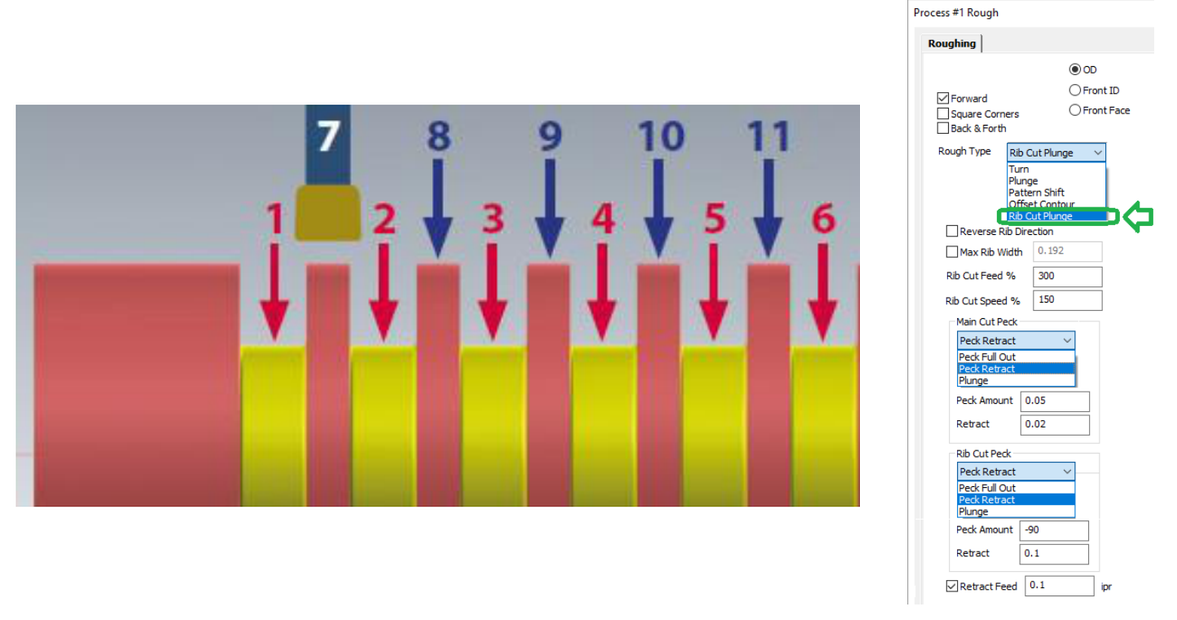
Figure 1 Rib Cut Plunge creates spaced cuts, then removes the remaining ribs
Source: What's New in GibbsCAM 2025, p. 16
Step 3 - Validate the Rib Cut Operation
1. Run Op Simulation and inspect the plunge spacing, rib removal, remaining stock, tool and holder clearance, peck motion, and retracts.
2. Post with the approved machine-specific postprocessor and complete controlled prove-out. Verify chip control, spindle load, finish, dimensions, cycle time, and insert wear.
Configure Swiss Headstock Origin
Step 1 - Select the Lathe Spindle Node
1. Open Machine Manager with a controlled copy of the approved Swiss-style MDD.
2. Select the lathe spindle node that represents the sliding headstock or main spindle.
3. Confirm that Has Guide Bushing is enabled for the intended part station.
Step 2 - Set Headstock Origin
1. Enable Headstock Origin.
2. Enter the approved distance from the guide-bushing front to the headstock zero position using the MDD's units and sign convention.
3. Save the machine definition under the approved name and revision process.
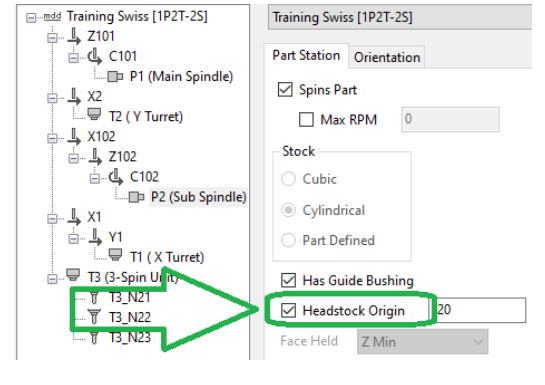
Figure 2 Headstock Origin locates the headstock zero from the guide-bushing front
Source: What's New in GibbsCAM 2025, p. 16
Step 3 - Validate the Swiss Setup
1. Run Machine Simulation through the required headstock travel and confirm that stock, guide bushing, spindle, tools, turrets, subspindle, and fixtures remain correctly positioned.
2. Check Z-axis limits, zero-return behavior, bar advance, transfers, cutoffs, and inter-operation moves for collision or overtravel.
3. Post with the matching approved machine configuration and review the output before controlled prove-out.
Expected Result
• Rib Cut Plunge creates separated preliminary plunges followed by cuts that remove the remaining ribs.
• The Rib Cut operation passes simulation, posted-code review, and controlled cutting validation.
• Headstock Origin positions Swiss simulation bodies correctly relative to the guide-bushing front and headstock zero.
Best Practices
• Record the approved Rib Cut tool, material, width, percentages, peck mode, and retract values.
• Compare Rib Cut with conventional roughing using cycle time, load, chips, finish, and insert wear.
• Use authoritative machine-builder data or a CAMCO-approved machine survey for Headstock Origin.
• Treat the MDD, simulation model, DCD, post, and machine parameters as one controlled configuration.
Troubleshooting
• Problem: Rib Cut Plunge is not available.
Cause
• The process is not a supported Turning Rough process.
• The GibbsCAM build or Turning license does not support the feature.
Resolution
Confirm GibbsCAM 2025, the required Turning license, and a supported Turning Rough process. Reopen the Roughing tab and check Rough Type.
• Problem: The Rib Cut pattern, load, or chip control is unacceptable.
Cause
• The tool, Max Rib Width, feed or speed percentage, peck behavior, profile, or stock allowance is unsuitable.
• Tool rigidity, machine power, or chip evacuation is inadequate.
Resolution
Stop the test and return to approved tooling data. Correct the tool, geometry, cutting values, or peck settings, then regenerate, simulate, and repeat controlled prove-out.
• Problem: Headstock Origin is unavailable.
Cause
• The selected node is not the supported lathe-spindle node.
• The machine definition does not support the Swiss-style setting or guide-bushing data is incomplete.
Resolution
Select the correct spindle node and confirm that the approved Swiss MDD supports Has Guide Bushing and Headstock Origin. Do not retrofit an unsupported MDD without CAMCO review.
• Problem: Swiss simulation bodies are shifted or move in the wrong direction.
Cause
• The Headstock Origin value, units, sign, selected node, stock origin, or axis limits are incorrect.
Resolution
Verify the guide-bushing-to-zero distance and machine conventions. Correct the controlled MDD, rerun full Machine Simulation, and review the matching posted output before prove-out.
Related Articles
• Create a Custom Stock Body for More Accurate Simulation
• Recommended Simulation Settings
• How to Create a Pack and Go File
Explore More from CAMCO
Visit the CAMCO website to learn more about:
• Downloads and Helpful Resources
Keywords
GibbsCAM 2025, Turning, Rib Cut Plunge, peck, Swiss-style machine, sliding headstock, guide bushing, Headstock Origin, Machine Manager, MDD, simulation