
Summary
GibbsCAM 2026 adds Multiblade Edge Finishing, separate feed controls for links and leads, feed control for edge extensions, expanded Blade Finishing tool types, and improved 4-axis Swarf geometric accuracy.
What Changed in GibbsCAM 2026
Before You Begin
• Use GibbsCAM 2026 with the required 5-Axis and supported ModuleWorks Multiblade or Swarf capabilities.
• For Swarf work, use an approved rotary-capable machine definition and production postprocessor.
• Define accurate tools, holders, stock, fixtures, blade, hub, shroud, edge, and slot surfaces.
• Save a copy of the part and retain baseline operations for comparison.
• Prepare representative Multiblade and 4-axis Swarf sample parts.
Procedure
Step 1 - Establish the Baseline
1. Duplicate the affected Multiblade or Swarf operations before changing them.
2. Record the tool, holder, tolerances, feed values, link settings, rotary limits, and estimated cycle time.
3. Simulate the baseline and save the result for comparison.
Step 2 - Add Multiblade Edge Finishing
1. Open the 5-Axis operation and go to the Surface Paths tab.
Select Calculation Based On > Multiblade Machining
Pattern > Machining > Edge Finishing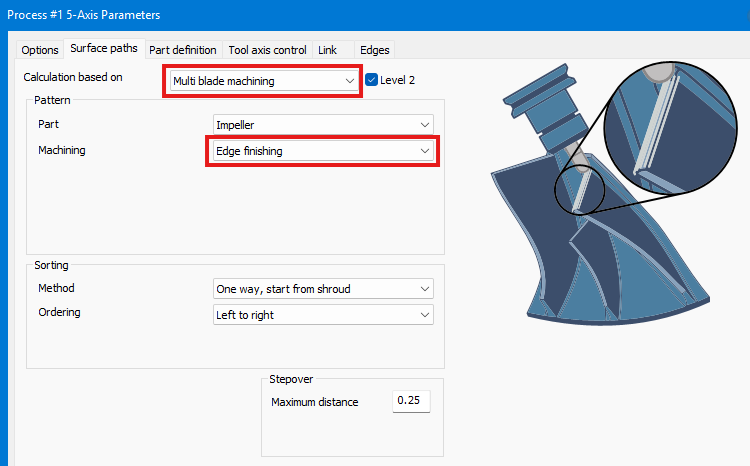
2. Select the required blade edge and supporting geometry, then calculate the operation.
3. Inspect the longitudinal pass for excess-stock removal, leading-edge protection, and acceptable surface quality.
4. Simulate with the production tool, holder, stock, and fixtures.
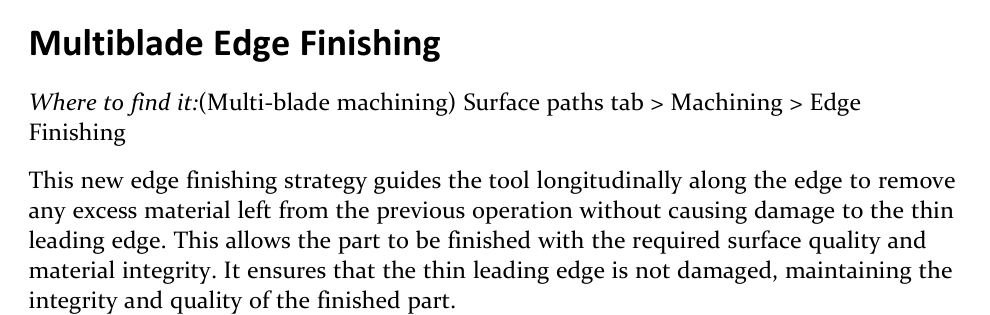
Figure 1 Use Edge Finishing to remove remaining edge material while protecting a thin leading edge
Source: What's New in GibbsCAM 2026, p. 38
Step 3 - Set Link and Lead Feedrates
1. On the Link tab, set Link Feedrate (%) for non-cutting link moves.
2. Set Lead-in Feedrate (%) and Lead-out Feedrate (%) as percentages of the toolpath feedrate.
3. Start conservatively, regenerate, and review every transition before using the settings to reduce cycle time.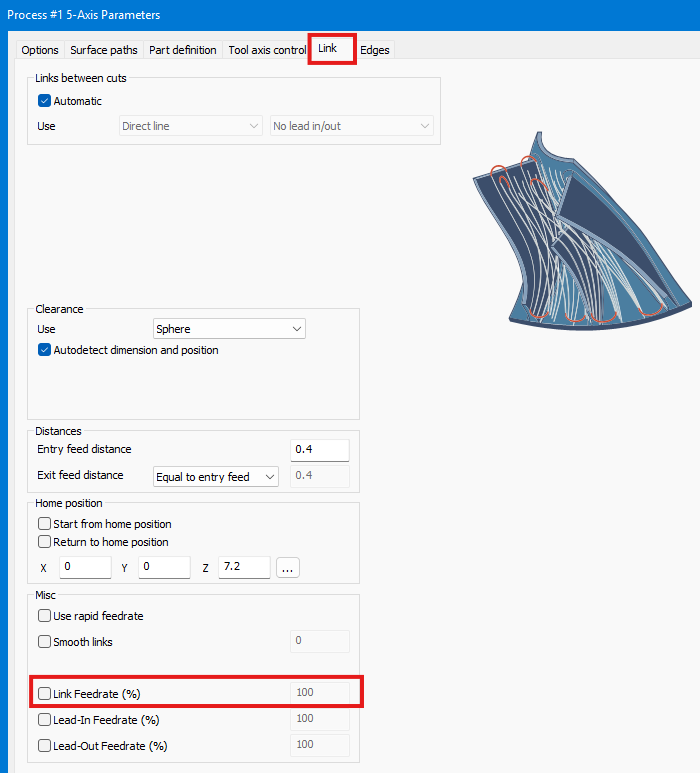
Step 4 - Set the Edge-Extension Feedrate
1. Locate the Feedrate (%) control for leading- and trailing-edge extensions in the installed GibbsCAM 2026 build.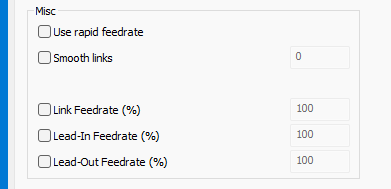
2. Confirm which extension segments the control affects and that they are non-cutting before increasing the value.
3. Regenerate and verify clearance, transition motion, and posted feed output.
Step 5 - Select a Supported Blade Finishing Tool
1. Choose the appropriate ball, bullnose, end, or taper tool type for Blade Finishing.
2. Define the complete tool and holder accurately, then recalculate the operation.
3. Inspect tool contact, reach, holder clearance, remaining stock, and surface quality.
Step 6 - Validate 4-Axis Swarf Accuracy
1. Create or edit a Multi-Axis Surface Finishing > Swarf operation for the target cylindrical cam, slot, or comparable surface.
2. If required by the job, use a tool smaller than the slot and recalculate with the GibbsCAM 2026 Swarf engine.
3. Inspect flank contact, geometric result, gouge clearance, rotary motion, and machine-axis limits.
4. Compare the result with the baseline and verify the complete posted motion.
Figure 2 Review the improved 4-axis Swarf result when the tool is smaller than the slot
Source: What's New in GibbsCAM 2026, p. 40
Step 7 - Approve the Result
1. Compare surface quality, transitions, remaining stock, cycle time, collisions, feed output, and axis motion with the baseline.
2. Run Op Simulation and Machine Simulation with accurate production components.
3. Post with the approved postprocessor, review the output, and complete the shop's controlled prove-out.
Expected Result
• Multiblade Edge Finishing removes remaining edge material without damaging the thin leading edge.
• Link, lead, and edge-extension feed controls produce reviewed transitions and expected posted feed values.
• The selected Blade Finishing tool clears the part and holder while producing the required surface.
• The 4-axis Swarf operation provides an improved geometric result with safe rotary motion and machine limits.
Best Practices
• Change one control at a time and compare each result with a saved baseline.
• Treat higher feed percentages as a cycle-time optimization only after confirming the affected motion is non-cutting and clear.
• Recheck tool contact, holder clearance, and remaining stock whenever the Blade Finishing tool type changes.
• Verify posted feed values and rotary motion; the graphics result alone is not production approval.
Troubleshooting
• Problem: Edge Finishing is unavailable in the Multiblade operation.
Cause
• The installed GibbsCAM build or licensed ModuleWorks capability does not include the feature.
• The operation type or selected geometry does not support Edge Finishing.
Resolution
Confirm GibbsCAM 2026, required 5-Axis licensing, and the supported Multiblade operation. Recheck the blade and edge geometry, then contact CAMCO if the control is still unavailable.
• Problem: The thin leading edge is gouged or excess stock remains.
Cause
• The selected edge, tool, allowance, tolerance, or contact settings are incorrect.
• The preceding operation left inconsistent stock or the tool cannot reach the full edge safely.
Resolution
Verify the selected geometry and complete tool assembly, inspect the preceding result, and adjust the allowance or toolpath conservatively. Recalculate and simulate the full edge before posting.
• Problem: A link, lead, or extension feed setting does not change the output.
Cause
• The changed control does not apply to the selected segment or the operation was not regenerated.
• The postprocessor or machine configuration overrides, filters, or formats the feed value.
Resolution
Identify the affected segment, regenerate the operation, and inspect both simulation and posted code.
• Problem: A new Blade Finishing tool type is rejected or causes a collision.
Cause
• The selected tool is outside the supported restrictions for that operation or GibbsCAM build.
• Tool, holder, reach, collision, or clearance data are incomplete or unsuitable.
Resolution
Confirm the supported tool type and dimensions, define the complete holder, and recalculate. Select a safer tool or revise the setup if simulation shows insufficient clearance.
• Problem: The 4-axis Swarf result still misses the target surface or exceeds rotary limits.
Cause
• The drive surfaces, tool diameter, orientation, tolerance, or flank-contact conditions are unsuitable.
• The selected machine definition, rotary range, or post configuration cannot reproduce the calculated motion.
Resolution
Verify the surfaces and tool, tighten the tolerance only as needed, and inspect tool-axis and flank contact. Recalculate with the approved machine definition, review limits and posted motion, and involve CAMCO or the post developer before machining.
Related Articles
• Create a Custom Stock Body for More Accurate Simulation
Explore More from CAMCO
Visit the CAMCO website to learn more about:
• Downloads and Helpful Resources
Keywords
GibbsCAM 2026, 5-Axis, Multiblade, Edge Finishing, Link Feedrate, Lead-in Feedrate, Lead-out Feedrate, edge extension, Blade Finishing, bullnose, taper tool, Swarf, 4-axis, flank milling, rotary machining