Summary
GibbsCAM 2024 adds Avoid clipping to Wireframe 2-Axis Profile when Compensation Type is set to Control. The option prevents overlapping cutter-radius-compensated contours from being merged in narrow areas.
Table of Contents
What Changed in GibbsCAM 2024
Important: Avoid clipping changes the compensated path but does not validate the controller's CRC behavior. Review the posted program and prove out the operation.
Before You Begin
• Use GibbsCAM 2024 with Wireframe 2-Axis Profile and a post that supports the required control compensation.
• Inspect the profile curves for overlaps, narrow regions, duplicates, and direction changes.
• Confirm the cutter diameter, CRC type, offset register, entry, exit, and activation distance.
• Save a working copy and retain baseline simulation and posted output.
Procedure
Step 1 - Create the Wireframe Profile
1. Set Calculation based on to Wireframe and select 2-Axis Profile.
2. Select and sequence the profile curves.
3. Confirm cutting side, tool, depth, entry, and exit settings before enabling compensation.
Step 2 - Configure Control Compensation
1. Open Surface paths.
2. Set Compensation Type to Control and select the approved CRC workflow.
3. Confirm the offset register and the lead motion required to activate and cancel compensation.
Step 3 - Enable Avoid Clipping
1. Select Avoid clipping.
2. Recalculate the operation.
3. Inspect narrow regions and overlapping contours to confirm that they remain separate.
Step 4 - Validate CRC Output
1. Run Op Simulation and Machine Simulation and review the uncompensated programmed path.
2. Post the operation and verify CRC activation, offset use, compensated direction, and cancellation.
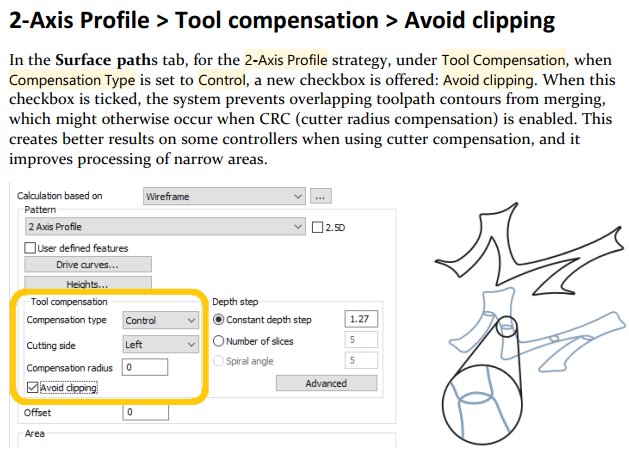
Figure 1 Avoid clipping keeps overlapping compensated contours separate Source: What's New in GibbsCAM 2024, p. 29
3. Check the available lead distance and complete a controlled prove-out with the approved offset value.
Expected Result
• Avoid clipping is available when Wireframe 2-Axis Profile uses Control compensation.
• Overlapping compensated contours remain separate in narrow regions.
• Posted CRC commands, offset use, activation, and cancellation match the validated setup.
Best Practices
• Repair duplicate or damaged curves before using Avoid clipping.
• Confirm the CRC type, post support, controller convention, and offset register before production.
• Provide enough straight or arc lead motion for reliable compensation activation and cancellation.
• Compare the posted program with a qualified CRC example for the target control.
Troubleshooting
• Problem: Avoid clipping is unavailable.
Cause
• The strategy is not Wireframe 2-Axis Profile.
• Compensation Type is not set to Control or the required option is not active.
Resolution
Confirm GibbsCAM 2024, Wireframe 2-Axis Profile, and Control compensation, then reopen Surface paths.
• Problem: Compensated contours still merge or clip.
Cause
• Avoid clipping is disabled.
• The profile curves contain duplicates, damaged segments, or geometry narrower than the programmed compensation allows.
Resolution
Enable Avoid clipping, repair the profile curves, verify cutter size and offset assumptions, and recalculate before posting again.
• Problem: The posted CRC result is incorrect.
Cause
• The post or controller CRC convention differs from the operation.
• The offset register, cutting side, or compensation direction is incorrect.
Resolution
Stop release. Verify the post, control convention, CRC type, cutting side, and offset data against a qualified example, then repost and prove out the correction.
• Problem: The control alarms when compensation starts or ends.
Cause
• The entry or exit does not provide enough activation distance.
• CRC is activated or cancelled where the controller does not allow it.
Resolution
Increase the approved lead distance or change the lead geometry, repost, and verify activation and cancellation in a controlled prove-out.
Related Articles
• How to Machine Open Shapes in GibbsCAM
• Recommended Simulation Settings
Explore More from CAMCO
Visit the CAMCO website to learn more about:
• Downloads and Helpful Resources
Keywords
GibbsCAM 2024, Wireframe, 2-Axis Profile, Avoid clipping, Control compensation, CRC, cutter radius compensation, offset register, compensated contour
Was this article helpful?
That’s Great!
Thank you for your feedback
Sorry! We couldn't be helpful
Thank you for your feedback
Feedback sent
We appreciate your effort and will try to fix the article