Summary
GibbsCAM 2025 lets Multiblade operations control leading- and trailing-edge rolling separately and assign different feed rates at the two edges. These controls help programmers match edge treatment and feed behavior to the blade geometry.
Table of Contents
- Summary
- What Changed in GibbsCAM 2025
- Before You Begin
- Procedure
- Best Practices
- Troubleshooting
- Related Articles
What Changed in GibbsCAM 2025
Important: The source release notes state that this 5-Axis section lacks full descriptions and illustrations. Confirm the controls and labels in the installed GibbsCAM 2025 build before changing production work.
Before You Begin
• Use GibbsCAM 2025 with the applicable Multiblade and 5-Axis products and licenses.
• Open a representative blade or impeller part with an approved machine definition, tool, holder, and post.
• Save a known-good operation, simulation result, and posted program for comparison.
• Define the required treatment and feed behavior for each edge before editing the operation.
Procedure
Step 1 - Establish a Baseline
1. Regenerate the existing Multiblade operation without changing its parameters.
2. Review the leading- and trailing-edge motion in simulation and save the result.
3. Record the current edge settings, feed values, cycle time, and posted output.
Step 2 - Set Edge Rolling
1. Open the Multiblade operation and select the Edges tab.
2. Set the leading-edge rolling method required by the machining plan.
3. Set the trailing edge to use the leading-edge setting or choose a separate method when the two edges require different treatment.
Step 3 - Set Edge Feed Behavior
1. Locate the feed-rate controls provided by the active Multiblade strategy.
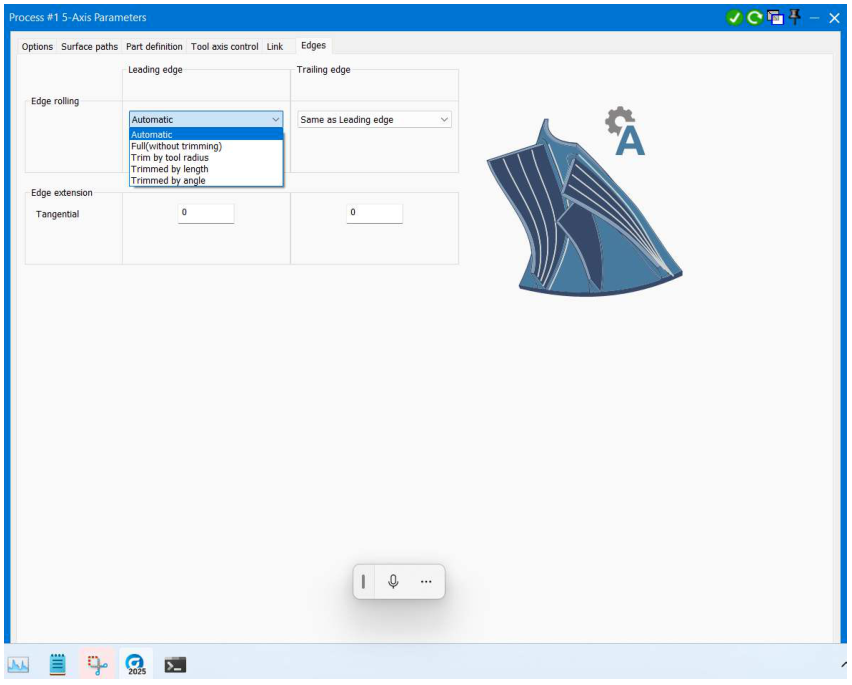
Figure 1 Review leading- and trailing-edge rolling independently
Source: What's New in GibbsCAM 2025, p. 30
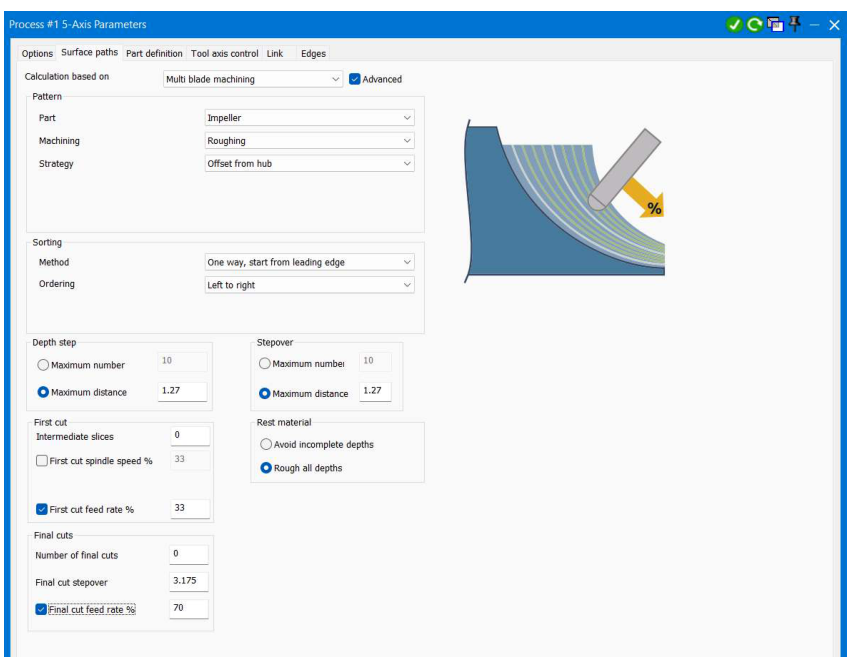
Figure 2 Multiblade feed-rate controls shown in the 2025 release notes
Source: What's New in GibbsCAM 2025, p. 31
2. Enter the approved leading- and trailing-edge feed values or percentages shown by the installed build.
3. Change one edge at a time and regenerate so the effect remains clear.
Step 4 - Validate the Result
1. Compare the regenerated path with the baseline at both blade edges.
2. Run complete simulation and inspect engagement, clearance, direction changes, and feed transitions.
3. Post the operation, review rotary and linear motion, and complete the shop's controlled prove-out before release.
Expected Result
• Leading and trailing edges use the intended rolling methods.
• The two edges use the approved feed behavior without abrupt or unsafe transitions.
• Simulation and posted output match the qualified machining plan.
Best Practices
• Change one edge control at a time and retain the baseline operation.
• Use the minimum feed change needed to meet the surface and tool-life requirement.
• Review both edge quality and machine motion after every regeneration.
• Revalidate the operation after a tool, geometry, strategy, MDD, or post change.
Troubleshooting
• Problem: Separate edge-rolling controls are unavailable.
Cause
• The active strategy or build does not expose the control.
• The required Multiblade or 5-Axis product or license is not active.
Resolution
Confirm the GibbsCAM build, licensed products, and selected Multiblade strategy. Reopen the operation with the supported configuration or contact CAMCO with the sample part and build details.
• Problem: The trailing edge still follows the leading-edge setting.
Cause
• The trailing edge is set to use the leading-edge method.
• The operation was not regenerated after the setting changed.
Resolution
Select a separate trailing-edge method, apply the change, regenerate, and compare the two edge paths in simulation.
• Problem: The feed change affects the wrong portion of the path.
Cause
• The selected field controls a different cut group in the active strategy.
• The release-note example and installed build use different labels or strategy settings.
Resolution
Restore the baseline, confirm the field's scope in the installed build, and test one conservative value. Escalate the exact build and sample file if the behavior remains unclear.
• Problem: Edge motion or surface quality worsens.
Cause
• The rolling method does not suit the blade geometry.
• The feed change is too large or creates an abrupt transition.
Resolution
Return to the qualified baseline, use a more conservative rolling or feed setting, and repeat simulation and prove-out before release.
Related Articles
• Recommended Simulation Settings
• How to Create a Pack and Go File
Explore More from CAMCO
Visit the CAMCO website to learn more about:
• Downloads and Helpful Resources
Keywords
GibbsCAM 2025, 5-Axis, Multiblade, leading edge, trailing edge, edge rolling, edge feed rate, blade machining, impeller, simulation
Was this article helpful?
That’s Great!
Thank you for your feedback
Sorry! We couldn't be helpful
Thank you for your feedback
Feedback sent
We appreciate your effort and will try to fix the article