Summary
GibbsCAM 2026 Machine Manager can clone a tool-group node together with all child nodes it contains. Use the command to reuse an existing hierarchy, then review and reconfigure the copied branch before validating the revised machine definition.
Table of Contents
What Changed in GibbsCAM 2026
Important: Cloning preserves a hierarchy for reuse; it does not make that hierarchy correct for a new station or machine state. Review every copied node and inherited value before saving or deploying the MDD.
Before You Begin
• Confirm that you are authorized and trained to edit the applicable MDD in Machine Manager.
• Create a recoverable, versioned backup and work in a separate MDD test copy.
• Identify the source tool group and the station or location the clone will represent.
• Prepare a representative part or VNC for validation after the hierarchy is configured.
Procedure
Step 1 - Open the MDD Test Copy
1. Open the approved test copy of the MDD in Machine Manager.
2. Expand the machine tree until the source tool-group node and its child nodes are visible.
3. Record the source node name, location, and important settings for comparison.
Step 2 - Clone the Tool Group
1. Select the tool-group node to reuse.
2. Right-click the node and choose Clone.
3. Expand the cloned node and confirm that its child nodes were copied.
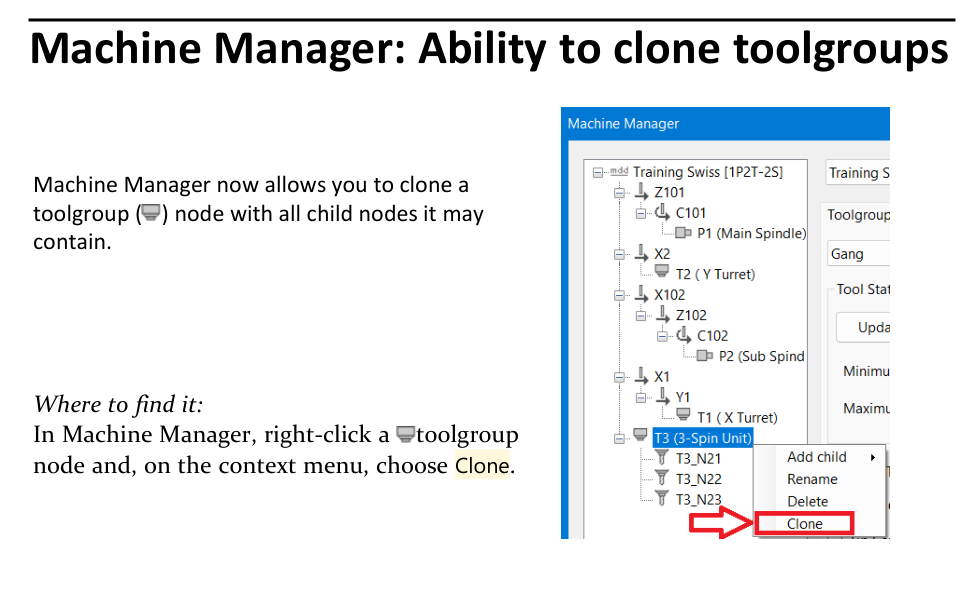
Figure 1 Clone a tool-group node together with its child nodes
Source: What's New in GibbsCAM 2026, p. 35
Step 3 - Configure the Cloned Hierarchy
1. Rename the cloned tool group according to the approved MDD naming standard.
2. Compare the source and cloned branches node by node.
3. Update the copied station, location, tool, orientation, limit, and relationship values required by the new use.
4. Remove only child nodes that are not valid for the intended hierarchy.
Step 4 - Validate and Save
1. Save the MDD with a distinct test revision and document the cloned branch and configuration changes.
2. Open the test definition in GibbsCAM 2026 and verify the tool group with a representative part or VNC.
3. Run complete Machine Simulation and review posted motion before the MDD is approved for deployment.
Expected Result
• The cloned tool-group node contains the source group's complete child hierarchy.
• The copied branch is renamed and configured for its intended station or location.
• The revised MDD passes the required simulation, posted-motion, and deployment review.
Best Practices
• Never test Machine Manager changes first in the only production MDD.
• Compare the source and cloned branches before modifying either one.
• Review every copied node and inherited value instead of assuming the clone is production-ready.
• Give each MDD revision a traceable owner, change description, and validation record.
Troubleshooting
• Problem: Clone is not available on the context menu.
Cause
• The selected tree item is not a tool-group node.
• The MDD is not open in an editable Machine Manager session.
Resolution
Select the actual tool-group node. If Clone remains unavailable, confirm the MDD edit state, user authorization, and GibbsCAM 2026 installation with the Machine Manager owner.
• Problem: The cloned tool group does not contain the expected child nodes.
Cause
• The expected nodes are not children of the selected source tool group.
• The cloned branch has not been fully expanded for review.
Resolution
Expand the source and cloned branches and compare them node by node. Correct the source selection or rebuild the approved hierarchy in the test MDD.
• Problem: The clone contains settings that do not apply to the new location.
Cause
• The cloned node retained values from the source hierarchy.
• The copied branch was renamed without reviewing its child-node configuration.
Resolution
Compare all copied nodes with the approved target configuration, update the invalid values, and repeat MDD validation before deployment.
• Problem: Simulation or posted motion is incorrect after cloning.
Cause
• The cloned station, orientation, limits, relationships, or tool data are incomplete.
• The test part, MDD, post, or machine configuration does not match production.
Resolution
Stop deployment. Correct the complete cloned hierarchy, confirm the approved MDD and post, then rerun simulation and posted-motion review with the representative test part.
Related Articles
• Recommended Simulation Settings
• How to Create a Pack and Go File
Explore More from CAMCO
Visit the CAMCO website to learn more about:
• Downloads and Helpful Resources
Keywords
GibbsCAM 2026, Machine Manager, MDD, tool group, toolgroup, Clone, child node, machine definition, MDD revision, Machine Simulation
Was this article helpful?
That’s Great!
Thank you for your feedback
Sorry! We couldn't be helpful
Thank you for your feedback
Feedback sent
We appreciate your effort and will try to fix the article