Summary
GibbsCAM 2026 adds Tool Axis Clearance Control. Supported operations can retract or approach along the tool axis until the motion connects with the configured clearance area.
Table of Contents
What Changed in GibbsCAM 2026
Important: A safe tool-tip path can still move the shaft or holder toward nearby material. Validate the complete assembly.
Before You Begin
• Use GibbsCAM 2026 with a supported Multi-Axis operation.
• Configure and validate the clearance area first.
• Define accurate stock, fixtures, tool, holder, and machine components.
• Duplicate the operation and retain its links and simulation as a baseline.
Procedure
Step 1 - Establish the Baseline
1. Calculate the duplicate operation with its current retract and approach settings.
2. Record link length, cycle time, holder clearance, and simulation results.
Step 2 - Enable Tool-Axis Motion
1. Open the Link tab for the supported operation.
2. Enable the option to retract or approach along the tool axis until it connects with clearance.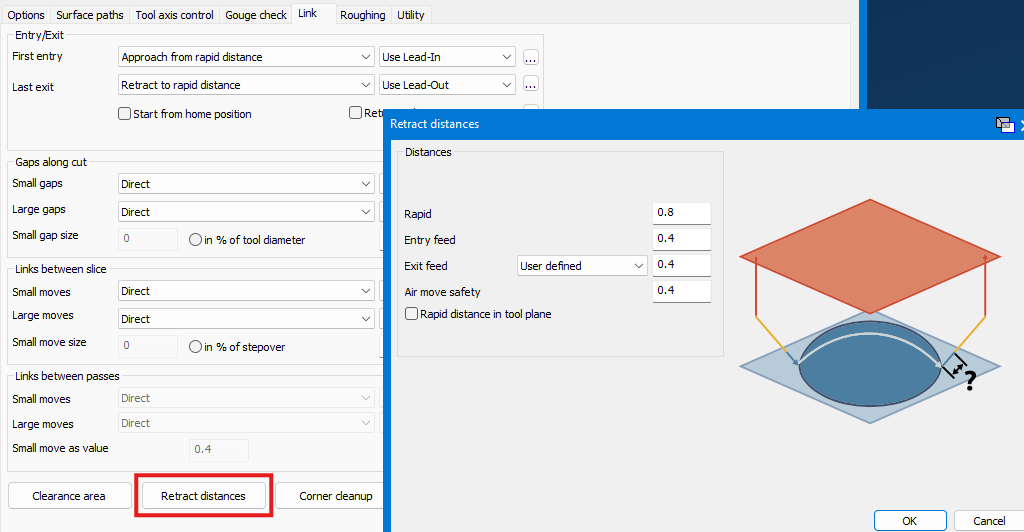
3. Regenerate the operation.
Step 3 - Validate the Transition
1. Inspect the complete transition, including the tool, shaft, holder, stock, and fixtures.
2. Compare link length, axis motion, and cycle time with the baseline.
3. Run Op Simulation and Machine Simulation, post with the approved postprocessor, and complete controlled prove-out.
Expected Result
• Retract or approach motion follows the tool axis to the clearance connection.
• The complete assembly remains clear and within machine limits.
• Posted motion matches the approved simulation.
Best Practices
• Configure clearance areas in the consolidated clearance article.
• Change one linking control at a time.
• Inspect the full transition from multiple views.
• Keep the baseline when tool-axis motion reduces holder clearance.
Troubleshooting
• Problem: Tool-axis motion is unsafe.
Cause
• The direction moves the shaft or holder toward material.
• The tilt or clearance connection does not suit the local geometry.
Resolution
Disable the option or revise the tool-axis and clearance settings, then regenerate and verify the full transition.
• Problem: The tool-axis option is unavailable.
Cause
• The strategy or installed build does not support it.
• The required Link controls are not active for the operation.
Resolution
Confirm strategy and build support with CAMCO and retain the validated baseline motion when unavailable.
Related Articles
• Recommended Simulation Settings
• How to Create a Pack and Go File
Explore More from CAMCO
Visit the CAMCO website to learn more about:
• Downloads and Helpful Resources
Keywords
GibbsCAM 2026, 5-Axis, Tool Axis Clearance Control, retract, approach, link, clearance connection, holder clearance
Was this article helpful?
That’s Great!
Thank you for your feedback
Sorry! We couldn't be helpful
Thank you for your feedback
Feedback sent
We appreciate your effort and will try to fix the article