Summary
GibbsCAM 2024 adds separate Avoid by relinking and Avoid by retracting controls to Swarf Gouge check. Each method can check selected surfaces and tool parts, then alter the path to move around detected interference.
Table of Contents
What Changed in GibbsCAM 2024
Important: Gouge avoidance depends on complete protected geometry and an accurate tool assembly. Simulation remains required after any avoidance change.
Before You Begin
• Use GibbsCAM 2024 with the required Swarf machining option and approved machine definition and post.
• Confirm the guide curves, Swarf surfaces, additional protected surfaces, and cutting direction.
• Define the cutter, flute, shaft, holder front, holder back, stickout, and required clearances.
• Save a baseline path and identify the interference that must be avoided.
Procedure
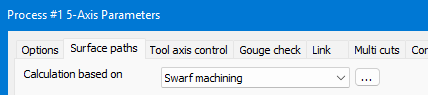
Step 1 - Open Swarf Gouge Check
1. Create or edit a Swarf Machining operation.
2. Open Gouge check and select the required check mode.
3. Confirm the Swarf and additional surfaces that must be protected.
Step 2 - Configure Avoid by Relinking
1. Under Avoid by relinking, select the surfaces to check.
2. Enter the approved Check faces clearance and select the tool parts to be checked.
3. Recalculate and review the new link motion around the detected interference.
Step 3 - Configure Avoid by Retracting
1. Under Avoid by retracting, select the surfaces to check.
2. Choose the approved retract direction, enter Check faces clearance, and select the tool parts to be checked.
3. Recalculate and review the retract, clearance, and re-entry motion.
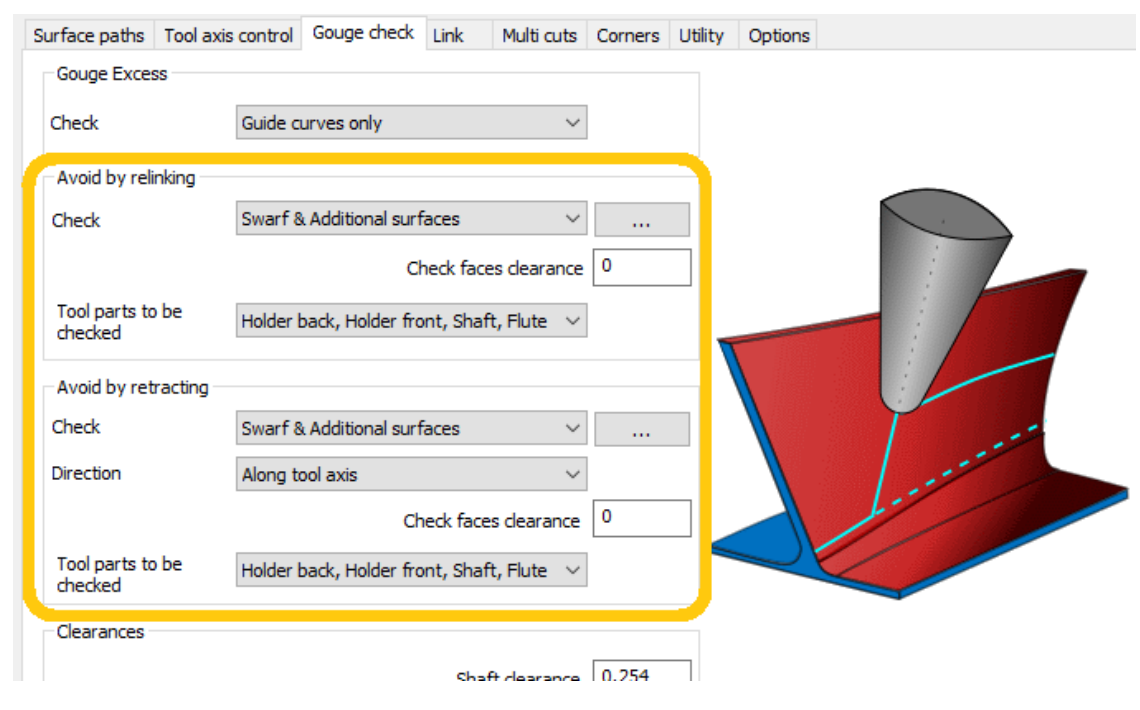
Figure 1 Swarf Machining adds separate relinking and retracting checks
Source: What's New in GibbsCAM 2024, p. 33
Step 4 - Compare and Validate
1. Use the avoidance method that clears the protected geometry with acceptable air motion and re-entry behavior.
2. Run Op Simulation and Machine Simulation with fixtures and machine components visible.
3. Verify clearance, travel, axis limits, and posted motion before a controlled prove-out.
Expected Result
• Detected Swarf interference is handled by the configured relink or retract motion.
• The checked tool parts maintain the approved clearance from the selected protected surfaces.
• Simulation shows reachable avoidance and re-entry motion without remaining gouges.
Best Practices
• Include every surface and tool component that can interfere with the physical setup.
• Compare relinking and retracting with the same protected geometry and clearances.
• Use shop-approved clearances; do not reduce them only to shorten the path.
• Revalidate after changing surfaces, guide curves, tool assembly, retract direction, machine definition, or clearances.
Troubleshooting
• Problem: Avoid by relinking or Avoid by retracting is unavailable.
Cause
• The operation is not using a supported Swarf strategy.
• The GibbsCAM version or licensed option does not support the controls.
Resolution
Confirm GibbsCAM 2024 and the required license, select Swarf Machining, and reopen Gouge check.
• Problem: Gouges remain after recalculation.
Cause
• The interfering surface or tool part is not included in the check.
• The clearance or tool assembly is incomplete or incorrect.
Resolution
Add the missing protected surfaces and tool parts, correct the assembly and clearance values, regenerate, and simulate the entire operation.
• Problem: Avoidance motion is excessive.
Cause
• Clearance is larger than required or too many surfaces are checked.
• The selected method creates longer motion for the detected interference.
Resolution
Verify the approved check set and clearance, then compare relinking with retracting without reducing clearance below the setup requirement.
• Problem: Retract or re-entry motion exceeds travel or creates a new risk.
Cause
• The retract direction is unsuitable for the machine or setup.
• The path approaches an axis limit, fixture, or singular orientation.
Resolution
Stop release. Select a supported retract direction or relinking method, verify machine limits and fixtures, and rerun complete Machine Simulation before posting.
Related Articles
• Recommended Simulation Settings
• How to Create a Pack and Go File
Explore More from CAMCO
Visit the CAMCO website to learn more about:
• Downloads and Helpful Resources
Keywords
GibbsCAM 2024, Swarf, Gouge check, Avoid by relinking, Avoid by retracting, check faces clearance, tool parts, retract direction
Was this article helpful?
That’s Great!
Thank you for your feedback
Sorry! We couldn't be helpful
Thank you for your feedback
Feedback sent
We appreciate your effort and will try to fix the article