Summary
In GibbsCAM 2026, Shrink Wrap fits cylindrical stock around the part instead of around the part's bounding box. Shrink Wrap Visible uses the visible model content.
Table of Contents
- What Changed in GibbsCAM 2026
- Before You Begin
- Procedure
- Related Video
- Best Practices
- Troubleshooting
- Related Articles
What Changed in GibbsCAM 2026
Important: Verify stock orientation and clearance before regenerating or releasing downstream operations.
Before You Begin
• Use GibbsCAM 2026 with cylindrical stock.
• Save a recoverable copy of the part.
• Decide whether all bodies or only visible bodies should control the envelope.
• Set body visibility deliberately.
Procedure
Step 1 - Prepare the Model
1. Confirm that the part uses cylindrical stock.
2. Show all controlling bodies, or hide bodies that Shrink Wrap Visible should ignore.
3. Review the current stock orientation.
Step 2 - Apply Shrink Wrap
1. Open Modify > Wrap.
2. Choose Shrink Wrap for the complete part or Shrink Wrap Visible for visible content.
3. Inspect the resulting cylindrical stock from multiple views.
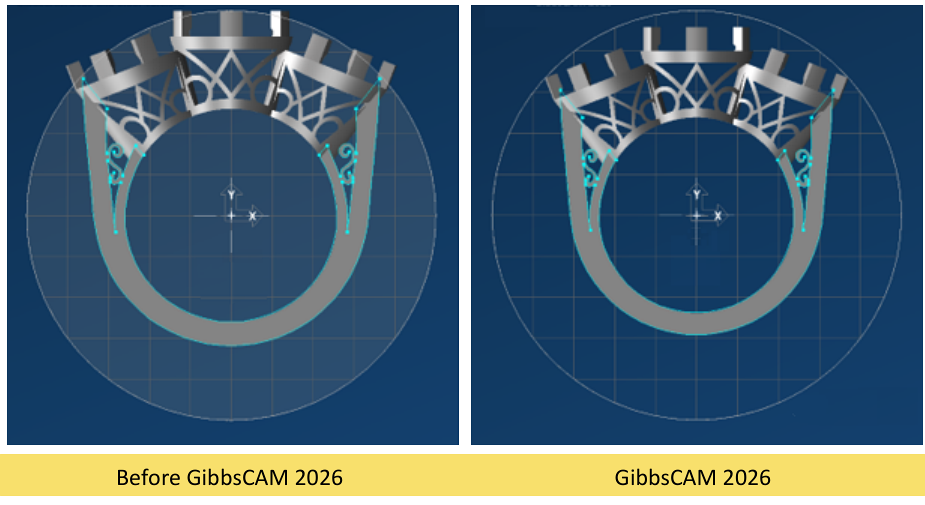
Figure 1 GibbsCAM 2026 fits cylindrical stock directly around the part
Source: What's New in GibbsCAM 2026, p. 21
Step 3 - Validate the Stock
1. Confirm stock orientation and the intended envelope.
2. Check part, fixture, and machine clearance.
3. Regenerate and simulate affected operations before production use.
Expected Result
• Cylindrical stock fits closely around the intended model content.
• Hidden bodies are excluded only when Shrink Wrap Visible is used.
• Affected operations remain valid in simulation.
Related Video
Best Practices
• Set visibility before running Shrink Wrap Visible.
• Inspect the result from several views.
• Recheck fixtures and setup clearance.
• Retain the prior stock definition until the result is approved.
Troubleshooting
• Problem: The stock envelope is unexpected.
Cause
• The part is not using cylindrical stock.
• Body visibility does not match the selected command.
Resolution
Confirm the stock type, set visibility deliberately, rerun the appropriate command, and inspect the result.
• Problem: Operations no longer match the stock.
Cause
• They were not regenerated after the stock changed.
• A stock-dependent boundary or setup assumption is outdated.
Resolution
Review the stock-dependent settings, regenerate affected operations, and rerun complete simulation.
Related Articles
• Recommended Simulation Settings
Explore More from CAMCO
Visit the CAMCO website to learn more about:
• Downloads and Helpful Resources
Keywords
GibbsCAM 2026, Shrink Wrap, Shrink Wrap Visible, cylindrical stock, stock envelope, model visibility
Was this article helpful?
That’s Great!
Thank you for your feedback
Sorry! We couldn't be helpful
Thank you for your feedback
Feedback sent
We appreciate your effort and will try to fix the article