Summary
GibbsCAM 2024 adds Start point to the Area controls for 5-Axis Finishing. The control designates where the finishing path begins on a closed guide curve so the approach and path start can be placed deliberately.
Table of Contents
What Changed in GibbsCAM 2024
Important: Moving the start point can change approach, link, tool-axis, and surface-mark behavior. Review the complete recalculated path.
Before You Begin
• Use GibbsCAM 2024 with the required 5-Axis finishing option and approved machine definition and post.
• Create or identify the closed guide curve and inspect it for gaps, overlaps, or duplicate segments.
• Choose a preferred start area with adequate tool, holder, and machine clearance.
• Save a baseline finishing path for comparison.
Procedure
Step 1 - Verify the Closed Guide Curve
1. Create or edit the 5-Axis Finishing operation.
2. Select the intended closed guide curve and machining surfaces.
3. Repair the curve before continuing if it is open, duplicated, or discontinuous.
Step 2 - Designate the Start Point
1. Open Surface paths and select Area.
2. Select Start point, then designate the preferred point on the closed guide curve.
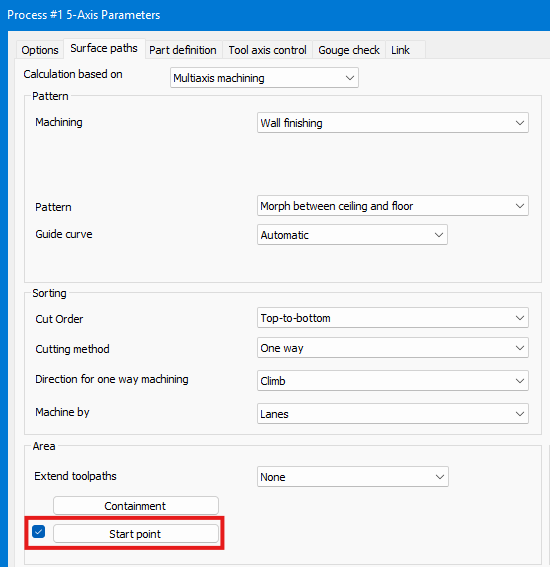
3. Choose a location that supports the intended approach and minimizes witness-mark risk.
Step 3 - Recalculate and Review
1. Recalculate the operation and identify the first cutting move.
2. Confirm that the path begins at the designated location and follows the intended direction.
3. Inspect the approach, first engagement, links, tool-axis motion, and transition into the finish pass.
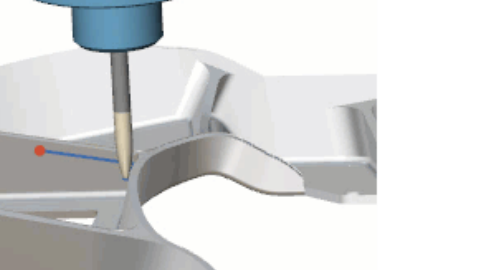
Figure 1 Start point controls where a closed guide-curve path begins Source: What's New in GibbsCAM 2024, p. 31
Step 4 - Validate the Finished Result
1. Run Op Simulation and Machine Simulation with the complete tool and holder assembly.
2. Compare the start area with the baseline for clearance, surface-mark risk, and machine motion.
3. Review posted motion and complete a controlled prove-out before production use.
Expected Result
• The finishing path begins at the designated point on the closed guide curve.
• The approach and first engagement occur in the intended region.
• Simulation shows acceptable clearance, tool-axis motion, and surface-mark risk.
Best Practices
• Place the start point in a stable, accessible area away from critical cosmetic surfaces when possible.
• Compare candidate start locations without changing other finishing controls.
• Inspect the curve direction and the first link as well as the designated point.
• Revalidate after editing the guide curve, surfaces, tool, leads, links, or machine setup.
Troubleshooting
• Problem: Start point is unavailable.
Cause
• The selected strategy does not support the control.
• The guide curve is not a valid closed curve or the required GibbsCAM option is unavailable.
Resolution
Confirm GibbsCAM 2024 and the required license, use the supported 5-Axis Finishing strategy, and repair or reselect the closed guide curve.
• Problem: The path starts somewhere else.
Cause
• The designated point is not on the active guide curve.
• The curve or operation changed after the point was selected.
Resolution
Reselect the active closed guide curve, designate a point directly on it, and regenerate the operation.
• Problem: The start area leaves a witness mark or poor entry.
Cause
• The selected point is on a critical or steep area.
• The approach or link settings are unsuitable for that location.
Resolution
Choose another accessible point on the closed curve or adjust the approved approach controls, then recalculate and compare the result.
• Problem: Links or tool-axis motion are unsafe near the start.
Cause
• The point is too close to a fixture, limit, or abrupt geometry change.
• The machine definition, tool assembly, or clearance controls are incomplete.
Resolution
Stop release. Correct the setup data or choose a safer point, then run complete Machine Simulation and review the posted motion.
Related Articles
• Recommended Simulation Settings
• How to Create a Pack and Go File
Explore More from CAMCO
Visit the CAMCO website to learn more about:
• Downloads and Helpful Resources
Keywords
GibbsCAM 2024, 5-Axis Finishing, Start point, closed guide curve, path start, approach, linking, witness mark
Was this article helpful?
That’s Great!
Thank you for your feedback
Sorry! We couldn't be helpful
Thank you for your feedback
Feedback sent
We appreciate your effort and will try to fix the article