Summary
GibbsCAM 2025 adds post commands that can query or output a solid operation's machining tolerance. An approved post can use that value for machine-specific output decisions, such as supported look-ahead behavior.
Table of Contents
- What Changed in GibbsCAM 2025
- Before You Begin
- Procedure
- Related Video
- Best Practices
- Troubleshooting
- Related Articles
What Changed in GibbsCAM 2025
Important: This enhancement requires a post upgrade. Existing posts do not gain tolerance-dependent output until the responsible post owner implements and validates the new commands.
Before You Begin
• Use GibbsCAM 2025 with a CAMCO-approved post revision that supports the new tolerance commands.
• Prepare a nonproduction part with a representative solid operation and a known machining tolerance.
• Confirm the active units and document the expected tolerance-dependent output for the target control.
• Save a baseline part and posted program before changing the tolerance.
Procedure
Step 1 - Confirm the Post Upgrade
1. Record the active post name and revision.
2. Confirm with CAMCO or the responsible post provider that the revision implements the GibbsCAM 2025 solid-operation tolerance commands.
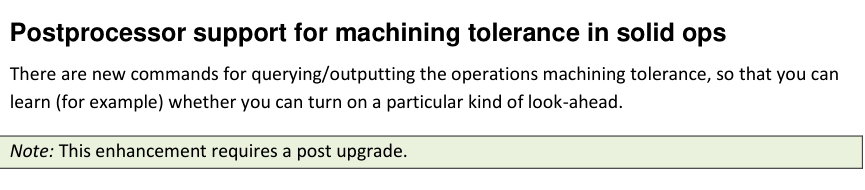
Figure 1 Use an upgraded post before testing tolerance-dependent output
Source: What's New in GibbsCAM 2025, p. 25
3. Stop the test and request an approved upgrade if the post has not been updated.
Step 2 - Post a Controlled Baseline
1. Select the representative solid operation and record its machining tolerance and units.
2. Post the operation with the approved revision.
3. Identify the exact NC output or post decision expected to use the tolerance value.
Step 3 - Compare a Second Approved Tolerance
1. Change only the operation tolerance to a second approved test value.
2. Recalculate and repost the same operation.
3. Compare the complete output and confirm that any difference matches the documented post logic.
Step 4 - Restore and Validate Production Data
1. Restore the production-approved machining tolerance.
2. Recalculate all affected operations and repost the complete program.
3. Run simulation, posted-code review, and the required controlled prove-out before release.
Expected Result
• The approved post reads the solid operation's machining tolerance in the correct units.
• Tolerance-dependent NC output changes only as defined by the validated post logic.
• The production program is regenerated with the approved tolerance and passes normal review.
Related Video
Best Practices
• Record the post name and revision with every qualification test.
• Use paired tests that change only the machining tolerance.
• Document units, thresholds, rounding, activation, and cancellation behavior in the post specification.
• Send CAMCO the part, post, MDD, baseline output, comparison output, and expected behavior when requesting support.
Troubleshooting
• Problem: The post ignores the solid operation's machining tolerance.
Cause
• The post has not been upgraded for the GibbsCAM 2025 commands.
• The active operation or post logic uses a different tolerance source.
Resolution
Confirm the operation and post revision. Request an approved post upgrade and retest with known tolerance values and documented expected output.
• Problem: Tolerance-dependent output changes unexpectedly.
Cause
• Units, thresholds, rounding, operation type, or post conditions differ between tests.
• An unrelated process setting changed.
Resolution
Restore the controlled baseline, vary only the tolerance, and compare the complete output. Escalate the results to the post owner.
• Problem: The post reports the wrong tolerance value or units.
Cause
• The part units or operation data do not match the post assumption.
• The post command or conversion logic is incomplete.
Resolution
Verify the operation tolerance and units in GibbsCAM, then have the post owner correct and validate the query or conversion logic.
• Problem: The upgraded post produces an error or incomplete output.
Cause
• The new command is used outside its supported operation context.
• The post's activation, fallback, or cancellation logic is incomplete.
Resolution
Stop release. Provide the part, post revision, error, and expected behavior to the post owner, then repeat the controlled qualification after the corrected upgrade.
Related Articles
• How to Create a Pack and Go File
Explore More from CAMCO
Visit the CAMCO website to learn more about:
• Downloads and Helpful Resources
Keywords
GibbsCAM 2025, post processor, solid operation, machining tolerance, post command, post upgrade, look-ahead, NC output, post validation
Was this article helpful?
That’s Great!
Thank you for your feedback
Sorry! We couldn't be helpful
Thank you for your feedback
Feedback sent
We appreciate your effort and will try to fix the article